> ## Documentation Index
> Fetch the complete documentation index at: https://docs.cheqpay.mx/llms.txt
> Use this file to discover all available pages before exploring further.
# Webhooks
> Get real-time notifications when payments complete, fail, or change status
## Why Webhooks?
Get real-time notifications when payments complete, fail, or change status. Webhooks keep your system in sync without polling.
Know immediately when payments complete or fail
Automatic retries ensure you never miss events
No need to constantly poll for status updates
Each webhook includes full payment details
## Setup
Create a route on your server to receive webhook POST requests.
Sign in to Cheqpay Suite, open **Settings** (bottom-left), then select **Webhooks** in the side menu. Click the cog icon to manage your webhook URL and secret. We recommend managing this yourself; alternatively, you can contact our support team if you prefer they configure it for you.
Always validate that webhooks come from Cheqpay (see security below).
### Configure in Cheqpay Suite
Cheqpay Suite is the control platform we provide to our registered clients to manage and monitor their operations. Access is typically granted as part of the contract signing process.
If you do not yet have Suite access, contact our support team at [support@cheqpay.mx](mailto:support@cheqpay.mx). They will confirm your account and guide you through the steps to get started.
Once you have access:
1. Sign in to your Cheqpay Suite session.
2. Open **Settings** from the bottom-left of the sidebar.
3. In the side menu, select **Webhooks**.
4. Click the cog icon on the Webhook card to manage your webhook URL and secret.
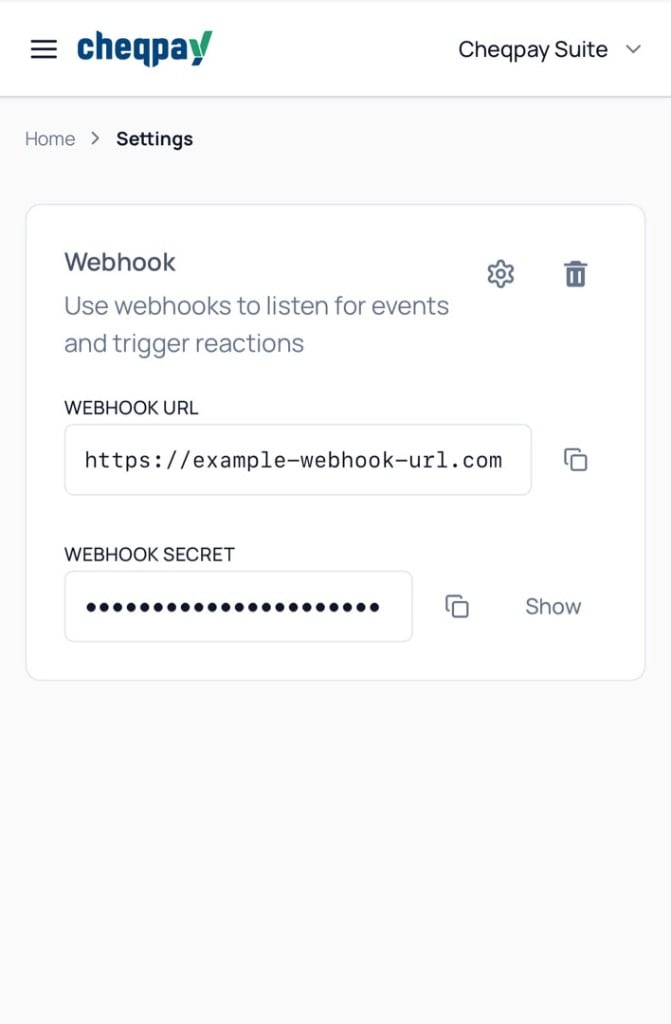
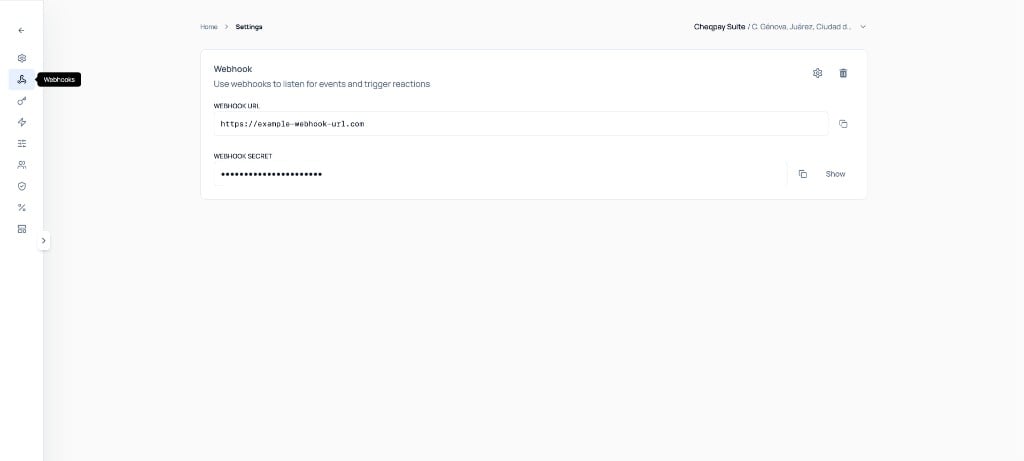 You can view, copy, and update your webhook URL and secret directly from Cheqpay Suite. Keep your webhook secret secure and never commit it to version control.
## Webhook Events
### Payment Events
| Event | Triggered When | Recommended Action |
| ------------------------- | ----------------------------- | ------------------------------- |
| `payment.auth.pending` | Authorization is pending | Show pending status to customer |
| `payment.auth.success` | Authorization successful | Confirm payment is authorized |
| `payment.auth.failed` | Authorization failed | Notify customer, offer retry |
| `payment.capture.success` | Payment captured successfully | Fulfill order |
| `payment.refund.pending` | Refund is being processed | Show refund pending status |
| `payment.refund.success` | Refund processed successfully | Confirm refund to customer |
### Subscription Events
| Event | Triggered When | Recommended Action |
| --------------------------- | ------------------------- | --------------------------------- |
| `subscription.plan_changed` | Subscription plan changed | Update user access, log analytics |
## Webhook Format
### Payment Events
Each webhook includes event details and payment information:
```json theme={null}
{
"id": "550e8400-e29b-41d4-a716-446655440000",
"event": "payment.capture.success",
"data": {
"paymentOrder": {
"id": "ord_xyz789",
"merchantReference": "ref-12345",
"externalId": "order-12345"
},
"customer": {
"id": "cus_ghi012",
"externalId": "customer-456"
},
"paymentMethod": {
"type": "card",
"options": {
"card": {
"id": "card_abc123"
}
}
},
"amount": "10000",
"currency": "MXN",
"createdAt": "2025-10-30T14:30:00.000Z"
}
}
```
For SPEI payments, the `paymentMethod` field looks like this:
```json theme={null}
{
"paymentMethod": {
"type": "spei",
"options": {
"clabe": "123456789012345678"
}
}
}
```
For PayCash payments, the `paymentMethod` field looks like this:
```json theme={null}
{
"paymentMethod": {
"type": "paycash",
"options": {
"paycash": {
"reference": "7041621293386809"
}
}
}
}
```
For CIE Cash Net payments, the `paymentMethod` field looks like this:
```json theme={null}
{
"paymentMethod": {
"type": "cie_cash_net",
"options": {
"cieCashNet": {
"reference": "01234567",
"convenio": "1234567",
"clabe": "123456789012345678"
}
}
}
}
```
CIE references are **8 digits**.
### Common Fields
| Field | Type | Description |
| ------------------------------------- | ------ | ------------------------------------------------------------------ |
| `id` | string | Unique event identifier (UUID) |
| `event` | string | Type of event (e.g. `payment.capture.success`) |
| `data` | object | Event-specific data |
| `data.paymentOrder.id` | string | Cheqpay payment order ID |
| `data.paymentOrder.merchantReference` | string | Your merchant reference |
| `data.paymentOrder.externalId` | string | Your external order ID |
| `data.customer.id` | string | Cheqpay customer ID |
| `data.customer.externalId` | string | Your external customer ID |
| `data.paymentMethod.type` | string | Payment method type (`card`, `spei`, `paycash`, or `cie_cash_net`) |
| `data.amount` | string | Payment amount |
| `data.currency` | string | Currency code (e.g. `MXN`) |
| `data.createdAt` | string | ISO 8601 timestamp of payment creation |
## Handle Webhooks Properly
### Requirements
Return `200 OK` within 5 seconds. Process data asynchronously.
Always check authenticity before processing events.
Queue work for background processing. Don't block the response.
Events may be sent multiple times. Make your handler idempotent.
### Example Handler (Node.js)
```javascript theme={null}
const express = require('express');
const crypto = require('crypto');
app.post('/webhooks/cheqpay', express.json(), (req, res) => {
// 1. Verify signature first
const signature = req.headers['x-webhook-signature'];
if (!verifySignature(req.body, signature)) {
return res.status(401).send('Invalid signature');
}
// 2. Respond immediately
res.status(200).send('OK');
// 3. Process in background
processWebhook(req.body);
});
function processWebhook(webhook) {
// Queue for async processing
queue.add('process-payment', {
id: webhook.id,
event: webhook.event,
data: webhook.data
});
}
```
### Example Handler (Python)
```python theme={null}
from flask import Flask, request
import hmac
import hashlib
app = Flask(__name__)
@app.route('/webhooks/cheqpay', methods=['POST'])
def webhook():
# 1. Verify signature
signature = request.headers.get('X-Webhook-Signature')
if not verify_signature(request.json, signature):
return 'Invalid signature', 401
# 2. Respond immediately
# 3. Process async
webhook_data = request.json
queue.enqueue(process_webhook, webhook_data)
return 'OK', 200
def process_webhook(data):
event = data['event']
if event == 'payment.capture.success':
fulfill_order(data['data']['paymentOrder']['externalId'])
elif event == 'payment.auth.failed':
notify_customer(data['data'])
# ... handle other events
```
## Security
Verify every webhook to ensure it's from Cheqpay.
**New merchants use the enriched signature by default.** Every newly created merchant has enriched webhook signatures enabled automatically. Existing merchants keep the [legacy signature](#legacy-signatures) unless enriched signatures are enabled for their account.
### How Signatures Work
Cheqpay signs webhooks using **HMAC-SHA256** with specific payload fields joined by a pipe (`|`) delimiter, plus the full webhook JSON body as the final part. The signature is sent in the `x-webhook-signature` header.
Including the full body ensures each delivery produces a unique signature (for example when the same amount and payment method appear on different orders), which improves reconciliation and tamper detection.
**For payment events**, the signed fields are:
```
paymentMethodId | amount | currency | event | JSON.stringify(payload)
```
**For subscription events**, the signed fields are:
```
subscriptionId | newPlanId | changeDirection | event | JSON.stringify(payload)
```
`JSON.stringify(payload)` must be the full webhook body you received (`id`, `event`, and `data`), stringified with standard JSON serialization.
### Signature Verification (Node.js)
```javascript theme={null}
const crypto = require('crypto');
function verifyPaymentSignature(payload, signature) {
const { data } = payload;
// Get the payment method ID based on type
let paymentMethodId;
if (data.paymentMethod.type === 'card') {
paymentMethodId = data.paymentMethod.options.card.id;
} else if (data.paymentMethod.type === 'spei') {
paymentMethodId = data.paymentMethod.options.clabe;
} else if (data.paymentMethod.type === 'paycash') {
paymentMethodId = data.paymentMethod.options.paycash.reference;
} else if (data.paymentMethod.type === 'cie_cash_net') {
paymentMethodId =
data.paymentMethod.options.cieCashNet.reference;
// options.cieCashNet also includes convenio and clabe when present
} else {
throw new Error('Unsupported payment method type');
}
const parts = [
paymentMethodId,
data.amount,
data.currency,
payload.event,
JSON.stringify(payload)
].join('|');
const expected = crypto
.createHmac('sha256', YOUR_WEBHOOK_SECRET)
.update(parts)
.digest('hex');
return crypto.timingSafeEqual(
Buffer.from(signature),
Buffer.from(expected)
);
}
```
### Signature Verification (Python)
```python theme={null}
import hmac
import hashlib
import json
def verify_payment_signature(payload, signature):
data = payload['data']
# Get the payment method ID based on type
pm = data['paymentMethod']
if pm['type'] == 'card':
payment_method_id = pm['options']['card']['id']
elif pm['type'] == 'spei':
payment_method_id = pm['options']['clabe']
elif pm['type'] == 'paycash':
payment_method_id = pm['options']['paycash']['reference']
elif pm['type'] == 'cie_cash_net':
payment_method_id = pm['options']['cieCashNet']['reference']
else:
raise ValueError('Unsupported payment method type')
parts = '|'.join([
payment_method_id,
str(data['amount']),
data['currency'],
payload['event'],
json.dumps(payload, separators=(',', ':'), ensure_ascii=False)
])
expected = hmac.new(
YOUR_WEBHOOK_SECRET.encode(),
parts.encode(),
hashlib.sha256
).hexdigest()
return hmac.compare_digest(signature, expected)
```
When stringifying the payload for verification, preserve the exact JSON key order from the request body. In Node.js, `JSON.stringify(req.body)` after `express.json()` is typically enough. In Python, prefer `json.dumps` with compact separators so the string matches Cheqpay's serialization as closely as possible.
### Legacy Signatures
**Legacy.** The field-only signature below applies to existing merchants that do **not** have enriched webhook signatures enabled. New merchants do not use this scheme.
#### How Legacy Signatures Work
Cheqpay signs webhooks using **HMAC-SHA256** with specific payload fields joined by a pipe (`|`) delimiter. The signature is sent in the `x-webhook-signature` header. The full webhook body is **not** included.
**For payment events**, the signed fields are:
```
paymentMethodId | amount | currency | event
```
**For subscription events**, the signed fields are:
```
subscriptionId | newPlanId | changeDirection | event
```
#### Legacy Signature Verification (Node.js)
```javascript theme={null}
const crypto = require('crypto');
function verifyPaymentSignature(payload, signature) {
const { data } = payload;
// Get the payment method ID based on type
let paymentMethodId;
if (data.paymentMethod.type === 'card') {
paymentMethodId = data.paymentMethod.options.card.id;
} else if (data.paymentMethod.type === 'spei') {
paymentMethodId = data.paymentMethod.options.clabe;
} else if (data.paymentMethod.type === 'paycash') {
paymentMethodId = data.paymentMethod.options.paycash.reference;
} else if (data.paymentMethod.type === 'cie_cash_net') {
paymentMethodId =
data.paymentMethod.options.cieCashNet.reference;
// options.cieCashNet also includes convenio and clabe when present
} else {
throw new Error('Unsupported payment method type');
}
const parts = [
paymentMethodId,
data.amount,
data.currency,
payload.event
].join('|');
const expected = crypto
.createHmac('sha256', YOUR_WEBHOOK_SECRET)
.update(parts)
.digest('hex');
return crypto.timingSafeEqual(
Buffer.from(signature),
Buffer.from(expected)
);
}
```
#### Legacy Signature Verification (Python)
```python theme={null}
import hmac
import hashlib
def verify_payment_signature(payload, signature):
data = payload['data']
# Get the payment method ID based on type
pm = data['paymentMethod']
if pm['type'] == 'card':
payment_method_id = pm['options']['card']['id']
elif pm['type'] == 'spei':
payment_method_id = pm['options']['clabe']
elif pm['type'] == 'paycash':
payment_method_id = pm['options']['paycash']['reference']
elif pm['type'] == 'cie_cash_net':
payment_method_id = pm['options']['cieCashNet']['reference']
else:
raise ValueError('Unsupported payment method type')
parts = '|'.join([
payment_method_id,
data['amount'],
data['currency'],
payload['event']
])
expected = hmac.new(
YOUR_WEBHOOK_SECRET.encode(),
parts.encode(),
hashlib.sha256
).hexdigest()
return hmac.compare_digest(signature, expected)
```
### PAYCASH Order Status Change Example
When a PayCash deposit is reconciled, you'll receive a status change event similar to this:
```json theme={null}
{
"id": "evt_paycash_001",
"event": "payment.capture.success",
"data": {
"paymentOrder": {
"id": "ord_paycash_123",
"merchantReference": "order-2001",
"externalId": "order-2001"
},
"customer": {
"id": "cus_abc123",
"externalId": "customer-2001"
},
"paymentMethod": {
"type": "paycash",
"options": {
"paycash": {
"reference": "7041621293386809"
}
}
},
"amount": "125000",
"currency": "MXN",
"createdAt": "2026-05-22T12:45:00.000Z"
}
}
```
### CIE Cash Net Order Status Change Example
When a CIE Cash Net deposit is reconciled, you'll receive a status change event similar to this:
```json theme={null}
{
"id": "evt_cie_001",
"event": "payment.capture.success",
"data": {
"paymentOrder": {
"id": "ord_cie_123",
"merchantReference": "order-301",
"externalId": "order-301"
},
"customer": {
"id": "cus_abc123",
"externalId": "customer-301"
},
"paymentMethod": {
"type": "cie_cash_net",
"options": {
"cieCashNet": {
"reference": "01234567",
"convenio": "1234567",
"clabe": "012345678901234567"
}
}
},
"amount": "150000",
"currency": "MXN",
"createdAt": "2026-05-22T14:30:00.000Z"
}
}
```
Your webhook secret is available in Cheqpay Suite under Settings → Webhooks. Keep it secure and never commit it to version control.
## Handle Duplicate Events
Cheqpay uses payload hashing to prevent duplicate events, but your handler should still be idempotent:
```javascript theme={null}
async function processPaymentEvent(webhook) {
const eventId = webhook.id;
// Check if already processed
const existing = await db.webhookEvents.findOne({ eventId });
if (existing) {
console.log('Event already processed:', eventId);
return;
}
// Process the event
await fulfillOrder(webhook.data.paymentOrder.externalId);
// Mark as processed
await db.webhookEvents.insert({
eventId,
processedAt: new Date()
});
}
```
## Event-Specific Handling
### Payment Captured
```javascript theme={null}
if (webhook.event === 'payment.capture.success') {
const { paymentOrder, amount, customer } = webhook.data;
// Fulfill the order
await orders.fulfill(paymentOrder.externalId);
// Send confirmation email
await sendEmail(customer.id, {
subject: 'Payment Received',
template: 'payment-confirmation'
});
// Update inventory
await inventory.reduce(paymentOrder.externalId);
}
```
### Payment Authorization Failed
```javascript theme={null}
if (webhook.event === 'payment.auth.failed') {
const { paymentOrder, customer } = webhook.data;
// Notify customer
await sendEmail(customer.id, {
subject: 'Payment Failed',
template: 'payment-failed',
data: { orderId: paymentOrder.externalId }
});
// Update order status
await orders.update(paymentOrder.externalId, { status: 'payment_failed' });
}
```
### Refund Processed
```javascript theme={null}
if (webhook.event === 'payment.refund.success') {
const { paymentOrder, amount, customer } = webhook.data;
// Update order status
await orders.update(paymentOrder.externalId, { status: 'refunded' });
// Notify customer
await sendEmail(customer.id, {
subject: 'Refund Processed',
template: 'refund-confirmation',
data: { amount }
});
}
```
### Subscription Plan Changed
Triggered when a customer changes their subscription plan. Includes complete proration details and whether the change was an upgrade or downgrade.
#### Payload Structure
```json theme={null}
{
"id": "550e8400-e29b-41d4-a716-446655440000",
"event": "subscription.plan_changed",
"data": {
"subscriptionId": "sub_abc123def456",
"customerId": "cus_customer789",
"previousPlan": {
"id": "plan_basic_monthly",
"name": "Basic Plan",
"amount": "9999"
},
"newPlan": {
"id": "plan_pro_monthly",
"name": "Pro Plan",
"amount": "19999"
},
"changeDirection": "upgrade",
"proration": {
"behavior": "always_invoice",
"netAmount": "5000",
"appliedOn": "immediate",
"invoiceId": "inv_xyz789",
"chargedAmount": "5000",
"chargedAt": "2026-01-30T10:30:00.000Z",
"nextInvoiceDate": "2026-02-15T00:00:00.000Z",
"nextInvoiceAmount": "19999",
"billingCycleReset": false
},
"changedAt": "2026-01-30T10:30:00.000Z"
}
}
```
#### Payload Fields
| Field | Type | Description |
| ----------------------------- | -------------- | ------------------------------------------------------------------------- |
| `subscriptionId` | string | Subscription identifier |
| `customerId` | string | Customer who owns the subscription |
| `previousPlan` | object | Plan before the change (`id`, `name`, `amount`) |
| `newPlan` | object | Plan after the change (`id`, `name`, `amount`) |
| `changeDirection` | string | `upgrade`, `downgrade`, or `same` |
| `proration` | object \| null | Proration details (null if behavior was `none`) |
| `proration.behavior` | string | Proration behavior used: `create_prorations`, `always_invoice`, or `none` |
| `proration.netAmount` | string \| null | Net proration amount (positive = charge, negative = credit) |
| `proration.appliedOn` | string \| null | When proration applied: `immediate`, `next_invoice`, or `deferred` |
| `proration.invoiceId` | string | Invoice ID if immediate charge was created |
| `proration.chargedAmount` | string | Amount charged immediately (if `appliedOn` is `immediate`) |
| `proration.chargedAt` | string | ISO 8601 timestamp of charge |
| `proration.nextInvoiceDate` | string | Date of next invoice |
| `proration.nextInvoiceAmount` | string | Expected amount of next invoice |
| `proration.billingCycleReset` | boolean | Whether billing cycle was reset |
| `changedAt` | string | ISO 8601 timestamp of plan change |
#### Subscription Signature Verification
Use the enriched scheme below (default for new merchants). For legacy merchants without enriched signatures, omit `JSON.stringify(payload)` from the signed string — see [Legacy Signatures](#legacy-signatures).
```javascript theme={null}
function verifySubscriptionSignature(payload, signature) {
const { data } = payload;
const parts = [
data.subscriptionId,
data.newPlan.id,
data.changeDirection,
payload.event,
JSON.stringify(payload)
].join('|');
const expected = crypto
.createHmac('sha256', YOUR_WEBHOOK_SECRET)
.update(parts)
.digest('hex');
return crypto.timingSafeEqual(
Buffer.from(signature),
Buffer.from(expected)
);
}
```
#### Example Handler
```javascript theme={null}
if (webhook.event === 'subscription.plan_changed') {
const { subscriptionId, customerId, newPlan, changeDirection, proration } = webhook.data;
// Update user's plan access
await users.updatePlan(customerId, {
planId: newPlan.id,
features: getFeatures(newPlan.id)
});
// Log the change for analytics
await analytics.track('plan_changed', {
customerId,
direction: changeDirection,
fromPlan: webhook.data.previousPlan.name,
toPlan: newPlan.name,
immediateCharge: proration?.appliedOn === 'immediate'
});
// Send email based on change type
if (changeDirection === 'upgrade') {
await sendEmail(customerId, {
subject: 'Welcome to ' + newPlan.name,
template: 'plan-upgrade',
data: {
newPlan: newPlan.name,
chargedAmount: proration?.chargedAmount,
nextInvoiceDate: proration?.nextInvoiceDate
}
});
} else if (changeDirection === 'downgrade') {
await sendEmail(customerId, {
subject: 'Plan Changed to ' + newPlan.name,
template: 'plan-downgrade',
data: {
newPlan: newPlan.name,
creditAmount: Math.abs(proration?.netAmount || 0),
nextInvoiceDate: proration?.nextInvoiceDate
}
});
}
}
```
**Proration can be null** if the merchant used `prorationBehavior: "none"` when changing the plan. Always check if `proration` exists before accessing its properties.
Use the `changeDirection` field to simplify your logic. You don't need to compare plan amounts manually.
## Automatic Retries
If your endpoint is unavailable, Cheqpay retries automatically with up to **10 attempts**.
### Test Mode (Sandbox)
Retries every **60 minutes** for up to 10 attempts.
### Live Mode (Production)
Webhook is sent to your endpoint.
Every 5 minutes (at 5, 10, 15, and 20 minutes after initial attempt).
Every 60 minutes until max retries are exhausted.
After all retries are exhausted, the webhook is marked as failed.
Set up monitoring to alert you of webhook failures before all retries are exhausted.
## Testing Locally
Use ngrok to test webhooks during development:
```bash theme={null}
# Install ngrok
npm install -g ngrok
# Start your local server
node server.js # Running on port 3000
# Expose to internet
ngrok http 3000
# Output:
# Forwarding: https://abc123.ngrok.io -> http://localhost:3000
```
Register the ngrok URL with Cheqpay:
```
https://abc123.ngrok.io/webhooks/cheqpay
```
Now you can test webhooks with your local development server!
Remember to update to your production URL before going live.
## Monitoring and Debugging
### Log All Webhooks
```javascript theme={null}
app.post('/webhooks/cheqpay', (req, res) => {
// Log webhook for debugging
logger.info('Webhook received', {
id: req.body.id,
event: req.body.event,
signature: req.headers['x-webhook-signature']
});
// ... rest of handler
});
```
### Monitor Webhook Health
Track webhook delivery and processing:
```javascript theme={null}
const metrics = {
received: 0,
processed: 0,
failed: 0,
averageProcessingTime: 0
};
async function processWebhook(webhook) {
metrics.received++;
const start = Date.now();
try {
await handleWebhook(webhook);
metrics.processed++;
} catch (error) {
metrics.failed++;
logger.error('Webhook processing failed', { error, webhook });
}
const duration = Date.now() - start;
metrics.averageProcessingTime =
(metrics.averageProcessingTime + duration) / 2;
}
```
## Best Practices
Always use HTTPS endpoints for production. Cheqpay will not send webhooks to HTTP URLs in live mode.
Never skip signature verification. This protects against spoofed webhooks.
Respond within 5 seconds. Use background jobs for actual processing.
Use the webhook `id` to track processed events and avoid duplicate processing.
Set up alerts for webhook failures. Investigate and fix issues quickly.
Log all webhook events for debugging and audit trails.
## Webhook Endpoint Requirements
Must use secure HTTPS connection in production
Endpoint must be publicly accessible
Return 200 OK within 5 seconds
Verify signatures on all requests
## Next Steps
Learn about payment statuses
Process refund webhooks
Test webhooks in sandbox
Handle webhook errors gracefully
You can view, copy, and update your webhook URL and secret directly from Cheqpay Suite. Keep your webhook secret secure and never commit it to version control.
## Webhook Events
### Payment Events
| Event | Triggered When | Recommended Action |
| ------------------------- | ----------------------------- | ------------------------------- |
| `payment.auth.pending` | Authorization is pending | Show pending status to customer |
| `payment.auth.success` | Authorization successful | Confirm payment is authorized |
| `payment.auth.failed` | Authorization failed | Notify customer, offer retry |
| `payment.capture.success` | Payment captured successfully | Fulfill order |
| `payment.refund.pending` | Refund is being processed | Show refund pending status |
| `payment.refund.success` | Refund processed successfully | Confirm refund to customer |
### Subscription Events
| Event | Triggered When | Recommended Action |
| --------------------------- | ------------------------- | --------------------------------- |
| `subscription.plan_changed` | Subscription plan changed | Update user access, log analytics |
## Webhook Format
### Payment Events
Each webhook includes event details and payment information:
```json theme={null}
{
"id": "550e8400-e29b-41d4-a716-446655440000",
"event": "payment.capture.success",
"data": {
"paymentOrder": {
"id": "ord_xyz789",
"merchantReference": "ref-12345",
"externalId": "order-12345"
},
"customer": {
"id": "cus_ghi012",
"externalId": "customer-456"
},
"paymentMethod": {
"type": "card",
"options": {
"card": {
"id": "card_abc123"
}
}
},
"amount": "10000",
"currency": "MXN",
"createdAt": "2025-10-30T14:30:00.000Z"
}
}
```
For SPEI payments, the `paymentMethod` field looks like this:
```json theme={null}
{
"paymentMethod": {
"type": "spei",
"options": {
"clabe": "123456789012345678"
}
}
}
```
For PayCash payments, the `paymentMethod` field looks like this:
```json theme={null}
{
"paymentMethod": {
"type": "paycash",
"options": {
"paycash": {
"reference": "7041621293386809"
}
}
}
}
```
For CIE Cash Net payments, the `paymentMethod` field looks like this:
```json theme={null}
{
"paymentMethod": {
"type": "cie_cash_net",
"options": {
"cieCashNet": {
"reference": "01234567",
"convenio": "1234567",
"clabe": "123456789012345678"
}
}
}
}
```
CIE references are **8 digits**.
### Common Fields
| Field | Type | Description |
| ------------------------------------- | ------ | ------------------------------------------------------------------ |
| `id` | string | Unique event identifier (UUID) |
| `event` | string | Type of event (e.g. `payment.capture.success`) |
| `data` | object | Event-specific data |
| `data.paymentOrder.id` | string | Cheqpay payment order ID |
| `data.paymentOrder.merchantReference` | string | Your merchant reference |
| `data.paymentOrder.externalId` | string | Your external order ID |
| `data.customer.id` | string | Cheqpay customer ID |
| `data.customer.externalId` | string | Your external customer ID |
| `data.paymentMethod.type` | string | Payment method type (`card`, `spei`, `paycash`, or `cie_cash_net`) |
| `data.amount` | string | Payment amount |
| `data.currency` | string | Currency code (e.g. `MXN`) |
| `data.createdAt` | string | ISO 8601 timestamp of payment creation |
## Handle Webhooks Properly
### Requirements
Return `200 OK` within 5 seconds. Process data asynchronously.
Always check authenticity before processing events.
Queue work for background processing. Don't block the response.
Events may be sent multiple times. Make your handler idempotent.
### Example Handler (Node.js)
```javascript theme={null}
const express = require('express');
const crypto = require('crypto');
app.post('/webhooks/cheqpay', express.json(), (req, res) => {
// 1. Verify signature first
const signature = req.headers['x-webhook-signature'];
if (!verifySignature(req.body, signature)) {
return res.status(401).send('Invalid signature');
}
// 2. Respond immediately
res.status(200).send('OK');
// 3. Process in background
processWebhook(req.body);
});
function processWebhook(webhook) {
// Queue for async processing
queue.add('process-payment', {
id: webhook.id,
event: webhook.event,
data: webhook.data
});
}
```
### Example Handler (Python)
```python theme={null}
from flask import Flask, request
import hmac
import hashlib
app = Flask(__name__)
@app.route('/webhooks/cheqpay', methods=['POST'])
def webhook():
# 1. Verify signature
signature = request.headers.get('X-Webhook-Signature')
if not verify_signature(request.json, signature):
return 'Invalid signature', 401
# 2. Respond immediately
# 3. Process async
webhook_data = request.json
queue.enqueue(process_webhook, webhook_data)
return 'OK', 200
def process_webhook(data):
event = data['event']
if event == 'payment.capture.success':
fulfill_order(data['data']['paymentOrder']['externalId'])
elif event == 'payment.auth.failed':
notify_customer(data['data'])
# ... handle other events
```
## Security
Verify every webhook to ensure it's from Cheqpay.
**New merchants use the enriched signature by default.** Every newly created merchant has enriched webhook signatures enabled automatically. Existing merchants keep the [legacy signature](#legacy-signatures) unless enriched signatures are enabled for their account.
### How Signatures Work
Cheqpay signs webhooks using **HMAC-SHA256** with specific payload fields joined by a pipe (`|`) delimiter, plus the full webhook JSON body as the final part. The signature is sent in the `x-webhook-signature` header.
Including the full body ensures each delivery produces a unique signature (for example when the same amount and payment method appear on different orders), which improves reconciliation and tamper detection.
**For payment events**, the signed fields are:
```
paymentMethodId | amount | currency | event | JSON.stringify(payload)
```
**For subscription events**, the signed fields are:
```
subscriptionId | newPlanId | changeDirection | event | JSON.stringify(payload)
```
`JSON.stringify(payload)` must be the full webhook body you received (`id`, `event`, and `data`), stringified with standard JSON serialization.
### Signature Verification (Node.js)
```javascript theme={null}
const crypto = require('crypto');
function verifyPaymentSignature(payload, signature) {
const { data } = payload;
// Get the payment method ID based on type
let paymentMethodId;
if (data.paymentMethod.type === 'card') {
paymentMethodId = data.paymentMethod.options.card.id;
} else if (data.paymentMethod.type === 'spei') {
paymentMethodId = data.paymentMethod.options.clabe;
} else if (data.paymentMethod.type === 'paycash') {
paymentMethodId = data.paymentMethod.options.paycash.reference;
} else if (data.paymentMethod.type === 'cie_cash_net') {
paymentMethodId =
data.paymentMethod.options.cieCashNet.reference;
// options.cieCashNet also includes convenio and clabe when present
} else {
throw new Error('Unsupported payment method type');
}
const parts = [
paymentMethodId,
data.amount,
data.currency,
payload.event,
JSON.stringify(payload)
].join('|');
const expected = crypto
.createHmac('sha256', YOUR_WEBHOOK_SECRET)
.update(parts)
.digest('hex');
return crypto.timingSafeEqual(
Buffer.from(signature),
Buffer.from(expected)
);
}
```
### Signature Verification (Python)
```python theme={null}
import hmac
import hashlib
import json
def verify_payment_signature(payload, signature):
data = payload['data']
# Get the payment method ID based on type
pm = data['paymentMethod']
if pm['type'] == 'card':
payment_method_id = pm['options']['card']['id']
elif pm['type'] == 'spei':
payment_method_id = pm['options']['clabe']
elif pm['type'] == 'paycash':
payment_method_id = pm['options']['paycash']['reference']
elif pm['type'] == 'cie_cash_net':
payment_method_id = pm['options']['cieCashNet']['reference']
else:
raise ValueError('Unsupported payment method type')
parts = '|'.join([
payment_method_id,
str(data['amount']),
data['currency'],
payload['event'],
json.dumps(payload, separators=(',', ':'), ensure_ascii=False)
])
expected = hmac.new(
YOUR_WEBHOOK_SECRET.encode(),
parts.encode(),
hashlib.sha256
).hexdigest()
return hmac.compare_digest(signature, expected)
```
When stringifying the payload for verification, preserve the exact JSON key order from the request body. In Node.js, `JSON.stringify(req.body)` after `express.json()` is typically enough. In Python, prefer `json.dumps` with compact separators so the string matches Cheqpay's serialization as closely as possible.
### Legacy Signatures
**Legacy.** The field-only signature below applies to existing merchants that do **not** have enriched webhook signatures enabled. New merchants do not use this scheme.
#### How Legacy Signatures Work
Cheqpay signs webhooks using **HMAC-SHA256** with specific payload fields joined by a pipe (`|`) delimiter. The signature is sent in the `x-webhook-signature` header. The full webhook body is **not** included.
**For payment events**, the signed fields are:
```
paymentMethodId | amount | currency | event
```
**For subscription events**, the signed fields are:
```
subscriptionId | newPlanId | changeDirection | event
```
#### Legacy Signature Verification (Node.js)
```javascript theme={null}
const crypto = require('crypto');
function verifyPaymentSignature(payload, signature) {
const { data } = payload;
// Get the payment method ID based on type
let paymentMethodId;
if (data.paymentMethod.type === 'card') {
paymentMethodId = data.paymentMethod.options.card.id;
} else if (data.paymentMethod.type === 'spei') {
paymentMethodId = data.paymentMethod.options.clabe;
} else if (data.paymentMethod.type === 'paycash') {
paymentMethodId = data.paymentMethod.options.paycash.reference;
} else if (data.paymentMethod.type === 'cie_cash_net') {
paymentMethodId =
data.paymentMethod.options.cieCashNet.reference;
// options.cieCashNet also includes convenio and clabe when present
} else {
throw new Error('Unsupported payment method type');
}
const parts = [
paymentMethodId,
data.amount,
data.currency,
payload.event
].join('|');
const expected = crypto
.createHmac('sha256', YOUR_WEBHOOK_SECRET)
.update(parts)
.digest('hex');
return crypto.timingSafeEqual(
Buffer.from(signature),
Buffer.from(expected)
);
}
```
#### Legacy Signature Verification (Python)
```python theme={null}
import hmac
import hashlib
def verify_payment_signature(payload, signature):
data = payload['data']
# Get the payment method ID based on type
pm = data['paymentMethod']
if pm['type'] == 'card':
payment_method_id = pm['options']['card']['id']
elif pm['type'] == 'spei':
payment_method_id = pm['options']['clabe']
elif pm['type'] == 'paycash':
payment_method_id = pm['options']['paycash']['reference']
elif pm['type'] == 'cie_cash_net':
payment_method_id = pm['options']['cieCashNet']['reference']
else:
raise ValueError('Unsupported payment method type')
parts = '|'.join([
payment_method_id,
data['amount'],
data['currency'],
payload['event']
])
expected = hmac.new(
YOUR_WEBHOOK_SECRET.encode(),
parts.encode(),
hashlib.sha256
).hexdigest()
return hmac.compare_digest(signature, expected)
```
### PAYCASH Order Status Change Example
When a PayCash deposit is reconciled, you'll receive a status change event similar to this:
```json theme={null}
{
"id": "evt_paycash_001",
"event": "payment.capture.success",
"data": {
"paymentOrder": {
"id": "ord_paycash_123",
"merchantReference": "order-2001",
"externalId": "order-2001"
},
"customer": {
"id": "cus_abc123",
"externalId": "customer-2001"
},
"paymentMethod": {
"type": "paycash",
"options": {
"paycash": {
"reference": "7041621293386809"
}
}
},
"amount": "125000",
"currency": "MXN",
"createdAt": "2026-05-22T12:45:00.000Z"
}
}
```
### CIE Cash Net Order Status Change Example
When a CIE Cash Net deposit is reconciled, you'll receive a status change event similar to this:
```json theme={null}
{
"id": "evt_cie_001",
"event": "payment.capture.success",
"data": {
"paymentOrder": {
"id": "ord_cie_123",
"merchantReference": "order-301",
"externalId": "order-301"
},
"customer": {
"id": "cus_abc123",
"externalId": "customer-301"
},
"paymentMethod": {
"type": "cie_cash_net",
"options": {
"cieCashNet": {
"reference": "01234567",
"convenio": "1234567",
"clabe": "012345678901234567"
}
}
},
"amount": "150000",
"currency": "MXN",
"createdAt": "2026-05-22T14:30:00.000Z"
}
}
```
Your webhook secret is available in Cheqpay Suite under Settings → Webhooks. Keep it secure and never commit it to version control.
## Handle Duplicate Events
Cheqpay uses payload hashing to prevent duplicate events, but your handler should still be idempotent:
```javascript theme={null}
async function processPaymentEvent(webhook) {
const eventId = webhook.id;
// Check if already processed
const existing = await db.webhookEvents.findOne({ eventId });
if (existing) {
console.log('Event already processed:', eventId);
return;
}
// Process the event
await fulfillOrder(webhook.data.paymentOrder.externalId);
// Mark as processed
await db.webhookEvents.insert({
eventId,
processedAt: new Date()
});
}
```
## Event-Specific Handling
### Payment Captured
```javascript theme={null}
if (webhook.event === 'payment.capture.success') {
const { paymentOrder, amount, customer } = webhook.data;
// Fulfill the order
await orders.fulfill(paymentOrder.externalId);
// Send confirmation email
await sendEmail(customer.id, {
subject: 'Payment Received',
template: 'payment-confirmation'
});
// Update inventory
await inventory.reduce(paymentOrder.externalId);
}
```
### Payment Authorization Failed
```javascript theme={null}
if (webhook.event === 'payment.auth.failed') {
const { paymentOrder, customer } = webhook.data;
// Notify customer
await sendEmail(customer.id, {
subject: 'Payment Failed',
template: 'payment-failed',
data: { orderId: paymentOrder.externalId }
});
// Update order status
await orders.update(paymentOrder.externalId, { status: 'payment_failed' });
}
```
### Refund Processed
```javascript theme={null}
if (webhook.event === 'payment.refund.success') {
const { paymentOrder, amount, customer } = webhook.data;
// Update order status
await orders.update(paymentOrder.externalId, { status: 'refunded' });
// Notify customer
await sendEmail(customer.id, {
subject: 'Refund Processed',
template: 'refund-confirmation',
data: { amount }
});
}
```
### Subscription Plan Changed
Triggered when a customer changes their subscription plan. Includes complete proration details and whether the change was an upgrade or downgrade.
#### Payload Structure
```json theme={null}
{
"id": "550e8400-e29b-41d4-a716-446655440000",
"event": "subscription.plan_changed",
"data": {
"subscriptionId": "sub_abc123def456",
"customerId": "cus_customer789",
"previousPlan": {
"id": "plan_basic_monthly",
"name": "Basic Plan",
"amount": "9999"
},
"newPlan": {
"id": "plan_pro_monthly",
"name": "Pro Plan",
"amount": "19999"
},
"changeDirection": "upgrade",
"proration": {
"behavior": "always_invoice",
"netAmount": "5000",
"appliedOn": "immediate",
"invoiceId": "inv_xyz789",
"chargedAmount": "5000",
"chargedAt": "2026-01-30T10:30:00.000Z",
"nextInvoiceDate": "2026-02-15T00:00:00.000Z",
"nextInvoiceAmount": "19999",
"billingCycleReset": false
},
"changedAt": "2026-01-30T10:30:00.000Z"
}
}
```
#### Payload Fields
| Field | Type | Description |
| ----------------------------- | -------------- | ------------------------------------------------------------------------- |
| `subscriptionId` | string | Subscription identifier |
| `customerId` | string | Customer who owns the subscription |
| `previousPlan` | object | Plan before the change (`id`, `name`, `amount`) |
| `newPlan` | object | Plan after the change (`id`, `name`, `amount`) |
| `changeDirection` | string | `upgrade`, `downgrade`, or `same` |
| `proration` | object \| null | Proration details (null if behavior was `none`) |
| `proration.behavior` | string | Proration behavior used: `create_prorations`, `always_invoice`, or `none` |
| `proration.netAmount` | string \| null | Net proration amount (positive = charge, negative = credit) |
| `proration.appliedOn` | string \| null | When proration applied: `immediate`, `next_invoice`, or `deferred` |
| `proration.invoiceId` | string | Invoice ID if immediate charge was created |
| `proration.chargedAmount` | string | Amount charged immediately (if `appliedOn` is `immediate`) |
| `proration.chargedAt` | string | ISO 8601 timestamp of charge |
| `proration.nextInvoiceDate` | string | Date of next invoice |
| `proration.nextInvoiceAmount` | string | Expected amount of next invoice |
| `proration.billingCycleReset` | boolean | Whether billing cycle was reset |
| `changedAt` | string | ISO 8601 timestamp of plan change |
#### Subscription Signature Verification
Use the enriched scheme below (default for new merchants). For legacy merchants without enriched signatures, omit `JSON.stringify(payload)` from the signed string — see [Legacy Signatures](#legacy-signatures).
```javascript theme={null}
function verifySubscriptionSignature(payload, signature) {
const { data } = payload;
const parts = [
data.subscriptionId,
data.newPlan.id,
data.changeDirection,
payload.event,
JSON.stringify(payload)
].join('|');
const expected = crypto
.createHmac('sha256', YOUR_WEBHOOK_SECRET)
.update(parts)
.digest('hex');
return crypto.timingSafeEqual(
Buffer.from(signature),
Buffer.from(expected)
);
}
```
#### Example Handler
```javascript theme={null}
if (webhook.event === 'subscription.plan_changed') {
const { subscriptionId, customerId, newPlan, changeDirection, proration } = webhook.data;
// Update user's plan access
await users.updatePlan(customerId, {
planId: newPlan.id,
features: getFeatures(newPlan.id)
});
// Log the change for analytics
await analytics.track('plan_changed', {
customerId,
direction: changeDirection,
fromPlan: webhook.data.previousPlan.name,
toPlan: newPlan.name,
immediateCharge: proration?.appliedOn === 'immediate'
});
// Send email based on change type
if (changeDirection === 'upgrade') {
await sendEmail(customerId, {
subject: 'Welcome to ' + newPlan.name,
template: 'plan-upgrade',
data: {
newPlan: newPlan.name,
chargedAmount: proration?.chargedAmount,
nextInvoiceDate: proration?.nextInvoiceDate
}
});
} else if (changeDirection === 'downgrade') {
await sendEmail(customerId, {
subject: 'Plan Changed to ' + newPlan.name,
template: 'plan-downgrade',
data: {
newPlan: newPlan.name,
creditAmount: Math.abs(proration?.netAmount || 0),
nextInvoiceDate: proration?.nextInvoiceDate
}
});
}
}
```
**Proration can be null** if the merchant used `prorationBehavior: "none"` when changing the plan. Always check if `proration` exists before accessing its properties.
Use the `changeDirection` field to simplify your logic. You don't need to compare plan amounts manually.
## Automatic Retries
If your endpoint is unavailable, Cheqpay retries automatically with up to **10 attempts**.
### Test Mode (Sandbox)
Retries every **60 minutes** for up to 10 attempts.
### Live Mode (Production)
Webhook is sent to your endpoint.
Every 5 minutes (at 5, 10, 15, and 20 minutes after initial attempt).
Every 60 minutes until max retries are exhausted.
After all retries are exhausted, the webhook is marked as failed.
Set up monitoring to alert you of webhook failures before all retries are exhausted.
## Testing Locally
Use ngrok to test webhooks during development:
```bash theme={null}
# Install ngrok
npm install -g ngrok
# Start your local server
node server.js # Running on port 3000
# Expose to internet
ngrok http 3000
# Output:
# Forwarding: https://abc123.ngrok.io -> http://localhost:3000
```
Register the ngrok URL with Cheqpay:
```
https://abc123.ngrok.io/webhooks/cheqpay
```
Now you can test webhooks with your local development server!
Remember to update to your production URL before going live.
## Monitoring and Debugging
### Log All Webhooks
```javascript theme={null}
app.post('/webhooks/cheqpay', (req, res) => {
// Log webhook for debugging
logger.info('Webhook received', {
id: req.body.id,
event: req.body.event,
signature: req.headers['x-webhook-signature']
});
// ... rest of handler
});
```
### Monitor Webhook Health
Track webhook delivery and processing:
```javascript theme={null}
const metrics = {
received: 0,
processed: 0,
failed: 0,
averageProcessingTime: 0
};
async function processWebhook(webhook) {
metrics.received++;
const start = Date.now();
try {
await handleWebhook(webhook);
metrics.processed++;
} catch (error) {
metrics.failed++;
logger.error('Webhook processing failed', { error, webhook });
}
const duration = Date.now() - start;
metrics.averageProcessingTime =
(metrics.averageProcessingTime + duration) / 2;
}
```
## Best Practices
Always use HTTPS endpoints for production. Cheqpay will not send webhooks to HTTP URLs in live mode.
Never skip signature verification. This protects against spoofed webhooks.
Respond within 5 seconds. Use background jobs for actual processing.
Use the webhook `id` to track processed events and avoid duplicate processing.
Set up alerts for webhook failures. Investigate and fix issues quickly.
Log all webhook events for debugging and audit trails.
## Webhook Endpoint Requirements
Must use secure HTTPS connection in production
Endpoint must be publicly accessible
Return 200 OK within 5 seconds
Verify signatures on all requests
## Next Steps
Learn about payment statuses
Process refund webhooks
Test webhooks in sandbox
Handle webhook errors gracefully